
AveoDent charting
Dental charting software.
Click the tooth. Pick the surface. Done.
The AveoDent odontogram is designed at the chair with Dr. Kali, our co-founder and a practicing dentist. Charting should take the time it takes to say it out loud, not a tour of menus.
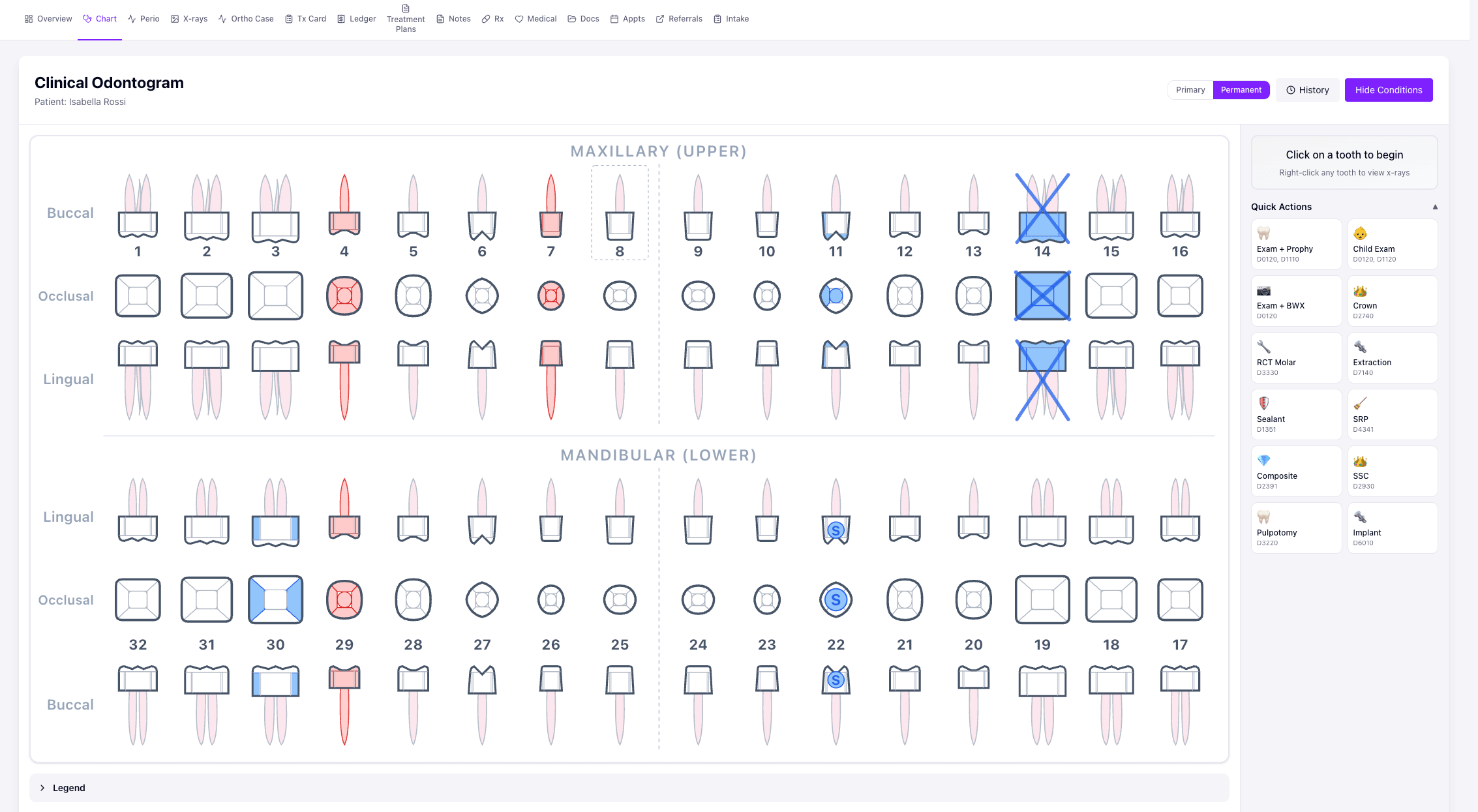
The chart below is the real one, running on demo data. Click a tooth.
The odontogram
The chart you will actually use.
Swipe to see the whole mouth →
Adult patient: Existing work in green, planned treatment in red, completed today in blue. A cavity on #19, a fracture on #8, a sealant on #30, and #1 planned for extraction.
Odontogram or dental charting?
An odontogram is the picture of the mouth: every tooth and surface, with conditions and treatment drawn where they are. Dental charting is the work done on it: recording what you find, what is already there, what you plan and what you finish. In AveoDent they are the same screen, and the chart feeds the rest of the visit.
- Planned work on the chart becomes a treatment plan in one step.
- Completing a procedure posts it to the patient ledger and starts the note from your template.
- X-rays open from the tooth you are charting.
How charting works
Fast where it matters.
Every tooth in three views
Buccal, occlusal and lingual rows for both arches, with real tooth shapes and roots. Click a surface right on the crown to mark it: mesial, distal, occlusal, buccal, lingual.
Colors that mean one thing
Existing work is green, planned treatment is red, completed is blue, on exactly the surfaces involved. Conditions have their own symbols: caries, recurrent caries, fracture, watch, abscess, impacted, missing.
Chart without the mouse
Arrow keys move between teeth, M, D, O, B and L pick surfaces, Enter confirms, Esc deselects. Fast for whoever is charting while the doctor calls it out.
Quick actions and procedure mode
One tap for common combinations like Exam + Prophy, Exam + BWX, Crown, RCT Molar, Composite or Extraction. Pick a procedure once and click every tooth it applies to.
X-rays from the tooth
Right-click a permanent tooth to open its x-rays; baby teeth have an x-ray button in the side panel. The films are a click away from the tooth you are charting, not in a separate program.
Kids on the same chart
Primary teeth carry letters A to T, and mixed dentition shows each child’s actual mouth, with permanent teeth taking their place as they come in. See it step by step on the pediatric page.
Each of these works on the real chart above. Try it on the chart ↑
Kids on the same chart
From baby teeth to adult teeth.
What we don’t do yet
Honest about the edges.
- Universal numbering only: 1 to 32 and A to T. No FDI or Palmer.
- Voice perio covers pocket depths only. Bleeding, recession and mobility are keyed in, with auto-advance.
- No CBCT 3D viewer.
See it by role
By practice
Chart a real case with us.
30 minutes with Sean and Kali. Bring the case your current software makes painful.